New Generation Kona EV

Power went out ~ 2 hours.
The V2L adapter (Hyundai version) worked well...and I loaded it up to the max. Took about 10 minutes to hook up all my pre-cut cords.
Flickered a bit when I plugged in the fridge, I expected it to shut down as I already had fireplace motor going as well as a bunch of lights and electronics but it did the job well.
Used about 1% SOC. :)
Nice! I'm still peeved that they inexplicably omitted it from my '24.
 
Power went out ~ 2 hours.
The V2L adapter (Hyundai version) worked well...and I loaded it up to the max. Took about 10 minutes to hook up all my pre-cut cords.
Flickered a bit when I plugged in the fridge, I expected it to shut down as I already had fireplace motor going as well as a bunch of lights and electronics but it did the job well.
Used about 1% SOC. :)
Yeah, heard on the news there was a big storm on the Island. Here on the Lower Mainland, just the usual fall rain storms today. Some wind but not enough to knock out power. But it could be coming, often does this time of year here, too. We have our VL2 adapter and extension chords ready if it/when it does.
 
We have our VL2 adapter and extension chords ready if it/when it does.
The hardest part to hook up was plugging the extension cord into the adapter itself.
One has to put a lot of pressure on the cap cover to release and then bend your head upside down and try to insert the 5-15 cord cap into the tight socket...ridiculous design.
I made a short (about 8 inches long) 14 AWG pigtail this morning so it can remain permanently connected into the socket and hang out for easy access, and still fit into the frunk with ease for storage.
 
Power went out ~ 2 hours.

Home made V2L source

1. Use a 1500W inverter.
(Notes: To be safe I built a home made switch/fuse concoction to be used between the inverter and the 12V battery of my Kona. Also, need to use short, heavy, min 4Ga, wire for this connection.)

2. Set the Kona to Utility Mode and voila! There is a V2L adapter.
A 1500W inverter is good for at least 1000W (@66%) load. With proper planning, these days it is enough for all kinds of loads. (e.g. furnace, internet router, TV, lights, etc. My inverter displays the current load on the unit in watts.)

3. If you disconnect the MAIN breaker in the panel and know what you are doing you can even feed the 120V output of the V2L device to the home wiring network and will have power for about 1/2 of your house. Forget about using any high wattage devices like stoves, microwave ovens, hairdryers, etc. Remember: You do not want to electrocute the person who was sent out to fix the problem. There is commercially available switch used between the grid and backup power generators to avoid this.

Disclaimer: I am not responsible if something goes wrong.
 
Last edited:
The hardest part to hook up was plugging the extension cord into the adapter itself.
One has to put a lot of pressure on the cap cover to release and then bend your head upside down and try to insert the 5-15 cord cap into the tight socket...ridiculous design.
I made a short (about 8 inches long) 14 AWG pigtail this morning so it can remain permanently connected into the socket and hang out for easy access, and still fit into the frunk with ease for storage.
My adapter has a 16' cord to a small outlet box, which is long enough to get into the house from the garage. From there I plug in extension cords as needed. My biggest concern at home is my salt water aquariums and sump systems, incl lights, pumps and heaters. Corals are very sensitive to temp changes and lack of circulation, so that is what I need to watch. I also use a watt meter so I can see how big a load I am drawing. It corresponds to the one on the car dash, so is accurate.

I only used it once so far, last Dec when we had a 7 hour outage. Worked well, kept everything that I wanted on. I still remember the biggest issue we had was boredom, because our TV and internet was out. Our cell phones worked, but that was it. We have a couple of gas fireplaces and a gas stove, and we made good use of them. Our garage door has a battery back-up too, so that was still operational.


Sure beats using a noisy generator.
 
Word here in the U.S. is this is the last year for Kona. Guess when my lease is up in December of 2026 I'll move into a Ioniq 5.
 
Pretty much, sadly. https://www.hyundainews.com/en-us/models/hyundai-kona-2026-kona_electric
2026 changes: only standard range battery, only SE trim line (with larger console tray).

My guess is that since the Kona is Korean-made and the Ioniq 5 is now US-made that the tariffs make it hard to maintain both good market segmentation and good profits between the two models.

And the 2025 Kona EV has pretty much disappeared from my area (NYC vicinity) only 2 in inventory within 250 miles. (Syracuse and Washington DC area)
 
This means NOTHING in the U.S. They are NOT going to have a new Kona for next year. It's been discontinued here. When I turn in my Kona Limited lease next December will likely get a Ioniq 5 SEL..
 
This means NOTHING in the U.S. They are NOT going to have a new Kona for next year. It's been discontinued here. When I turn in my Kona Limited lease next December will likely get a Ioniq 5 SEL..
I really can' understand why they are dumping the KONA. It has always seem to be rated high in their category. I have had two and no problems at all except for the batteries and I got a new one . Plus about a $1000.00 in cash way back.
 
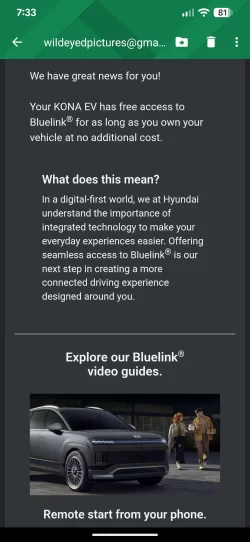
I just got a notice from Hyundai Canada that Blue link access has been extended to the life of ownership vs. the original 3 years! Nice surprise.
My wife asks: what do you do with it; what year and model do you have?

When she got her 2021 5.3 years ago, she said she wasn’t interested in anything to do with the Blue Link…and now every time she uses the car there is a reminder on her car screen about Blue Link and “enter here”…she has no idea what that would lead to, so she ignores it.

I must assume that, somewhat like my 2018 TM3, Blue Link has an app on a smart phone and one is able to monitor the status of the vehicle remotely (for example, when plugged in and charging at home plate).
 
My wife asks: what do you do with it; what year and model do you have?

When she got her 2021 5.3 years ago, she said she wasn’t interested in anything to do with the Blue Link…and now every time she uses the car there is a reminder on her car screen about Blue Link and “enter here”…she has no idea what that would lead to, so she ignores it.

I must assume that, somewhat like my 2018 TM3, Blue Link has an app on a smart phone and one is able to monitor the status of the vehicle remotely (for example, when plugged in and charging at home plate).
I currently have a '24 which came with 3 years of Blue link support. My previous '18 Kona came with 5 years. My original version was frequently glitchy and borderline useless a lot of the time. The current version with the current car is much more stable and useful. I remote heat and cool and remote charge mostly. I also check state of charge and health through the app.

Because your wife's car is older than 5 years now I'd assume that the car is prompting her to enroll in a paid service now that her free period has expired... just a guess.
 
I just got a notice from Hyundai Canada that Blue link access has been extended to the life of ownership vs. the original 3 years! Nice surprise.
This:
"Bluelink is free for three years with a new Hyundai purchase, including your Kona EV. After three years, you'll need to renew your subscription to keep using the service."
I just tried the Chat from the AI assistant on that webpage
and that is the response I get.
I also logged into Bluelink and checked the terms and conditions at the bottom of the page and no change:
2. FEES, PAYMENT, BILLING AND TAXES.

A. Fees and Billing. After your initial free 3 year trial period for the Hyundai Bluelink Service (2018 and 2019 model years the initial free trial period is 5 years) and, if applicable, any extension(s) of the initial free trial period granted by us, in our sole discretion, if we continue to offer Hyundai Bluelink Service, the service options, if applicable, fees and payment schedules for your Hyundai Bluelink Service will be as communicated to you or posted on the Hyundai Bluelink Service website www.myBluelink.ca. As the initial free 3 year trial period for the Hyundai Bluelink Service comes up for expiration (2018 and 2019 model years the initial free trial period is 5 years), including any extension(s) granted by us, in our sole discretion, you will be asked to provide Hyundai with your service option selection, if applicable, and valid payment information if you wish to continue with the Hyundai Bluelink Service. Unless the Hyundai Bluelink Service is cancelled by you or us as allowed by this Agreement, after the initial free 3 year trial period (2018 and 2019 model years the initial free trial period is 5 years), including any extension(s) granted by us, in our sole discretion, specified charges would apply depending on your service option selection, which you agree to pay. By providing payment account information to us, you represent that you are an authorized user of such payment account. The price(s) of your Hyundai Bluelink Service may change over time, and we will use the rates then in effect for the applicable payment period for those charges, which you agree to pay.


Maybe a local Promo-Ontario or Dealer?
Do you have a link or copy of the notice you received from Hyundai Canada?

 
Last edited:
It was an email from Hyundai Canada.
 

Attachments

  • Screenshot_20251209-193351.webp
    Screenshot_20251209-193351.webp
    110.5 KB · Views: 7
I did as well today, but it was for a 2016 Tuscon (never activated Blue Link on it) which we traded in on our 2023 Kona ev which we traded in on our 2026 Solterra a month ago when we also cancelled our Blue Link on it. With other issues have had with our local Hyundai dealer in the last year, we are beginning to get the impression that they really don't have a great customer data base (polite way of saying what we really think)
 
Back
Top