
You are using an out of date browser. It may not display this or other websites correctly.
You should upgrade or use an alternative browser.
You should upgrade or use an alternative browser.
How reliable is the Hondalink app for you?
- Thread starter Mark W
- Start date
- Replies 114
- Views 22K

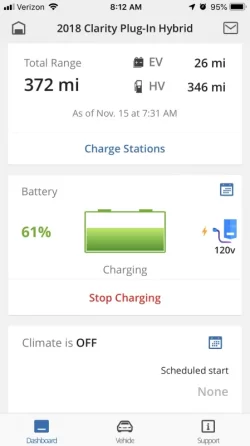
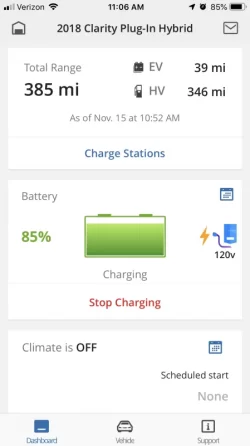
Mine is updating on 15% interval as well. First opened the app it’s showing the battery when I started charging at 61%, then few hours later it showed 70%(not pictured), and then it jumped to 85%. I would only assume at end of charging today before I leave work it would finally just show 100%
Attachments

AnthonyW
Well-Known Member
At home and work I connected the car to WIFI. The update interval doesn’t change but the app doesn’t “think” as long. Also when charging and I am close enough to my garage, the Bluetooth connects and I can get instantaneous updates of the state of charge and temp inside the car (if I’m preconditioning). If the charge is stopped or I move out of Bluetooth range I lose the instantaneous updates.
Sent from my iPhone using Inside EVs
Sent from my iPhone using Inside EVs
Use the app to turn it on
When I try and use the app to turn on pre conditioning it tells me I cannot because of the 110v. What I then did was use the app to stop charging, and then use the remote to start PC.
Then I could use the app to watch the temperature slowly rise from 36,42,45 over 15 minutes. I could hear a fan running near the windshield cowl but nowhere near as loud/fast as when the charging cable is unplugged.
The whole time the little green light near the charge port was lit though.
Sent from my iPhone using Tapatalk
Mark Weidner
New Member
Same experience here. I find that if you have your car connected to your wifi at home, it tends to report in better, but it's not totally reliable. I do use it to check the EV range after a charge, and this time of year, I'm glad I can turn on the climate control via my phone before going on a drive. Beyond that, you really can't rely on the location or odometer reading. I'd give it a 2 out of 5. Definitely wouldn't pay for it with its current abilities.The HondaLink app also sucks. But it does function and there is no indication we will have to pay for the service in the future. I assume it uses a low quality cell service.
I find that I can ping the car from my phone and 80% of the time get a response showing the battery charge level and range, and gas range (so far as the car shows that accurately!. The parking reminder seemed to work the few times I tried it.
The Odometer can fall behind and be showing data from a week to three weeks ago. Not that big a deal.
I've fired off Remote Climate a few times which seemed to work about 75% of the time.
Also the Find My Car works most of the time. It can't locate the car if it is moving.

petteyg359
Well-Known Member
Because it technically is charging while running climate if it is plugged in. It just doesn't have enough juice on 120V to actually increase the battery level AND run the A/C or heat at the same time, despite charging is exactly what is it doing while running the A/C or heat. You would think a software-controlled circuit could easily determine when and where to send power dependent upon the input, and automatically switch between "charging" charging and climate charging without requiring the user to manually fiddle with it...The whole time the little green light near the charge port was lit though.
Same experience here. I find that if you have your car connected to your wifi at home, it tends to report in better, but it's not totally reliable. I do use it to check the EV range after a charge, and this time of year, I'm glad I can turn on the climate control via my phone before going on a drive. Beyond that, you really can't rely on the location or odometer reading. I'd give it a 2 out of 5. Definitely wouldn't pay for it with its current abilities.
I find the location thing to be quite useful at the dealer's service center. If they're busy and can't leave it on the floor, they'll park it in the lot outside. It's a rather large lot and having the app send Google Maps a coordinate for me to walk to is very useful so I don't have to walk around the whole lot looking.
FWIW, yesterday for the first time I had climate control fail to start via the app. This was while it was plugged in in my garage (and maybe on Wi-Fi - it's set up and I know it can connect, but I'm not sure how often it actually listens to the connection when the system is off). This was also the first time I've tried to turn on climate control while it was cold out so it would warm up the car. All the other times were in the parking lot at work, with no Wi-Fi, cooling down after sitting in the Texas sun all day. Never had a problem with that.
Last edited:

lorem101
Active Member
Do you leave your car in econ mode?Yep, I can confirm that. Heating is VERY slow, though. Mine took about 20 minutes to go from 32 degrees to 42 inside temp this morning.
I found my car heats up much faster if I leave it in normal mode and my heated seats don't turn on either


The Owners Manual (page 195) mentions reduced cooling in ECON Mode, but nothing about reduced heating:Do you leave your car in econ mode?
I found my car heats up much faster if I leave it in normal mode and my heated seats don't turn on either
While ECON mode is active, the climate control
system may have reduced cooling performance.
lorem101
Active Member
I'm basing this on my experimentation with preconditioning. I don't use econ mode anymore and the car heats up very quickly, faster than any car I know.The Owners Manual (page 195) mentions reduced cooling in ECON Mode, but nothing about reduced heating:
While ECON mode is active, the climate control
system may have reduced cooling performance.
Next time you're driving switch between econ and normal mode, it immediately changes the speed of the fan (if you use auto climate set to a temperature).
I do admit I haven't tried sitting in the car and starting remote climate to check the air speed from the vent. Will give it a try when I get a chance

With regard to errors in the app, I'll share what I've seen. First, a general observation: when you've had the app open and then you switch to another app and switch back the HL app, it always wants to update its display. This behavior also applies to (Android, at least) when you had the HL app open and then didn't use your phone for the inactivity period in your phone's settings (after which the display turns off). When you cause your phone to wake up, the HL app will be in the foreground and try to update its information again (ping the server).
Given that bit of info, now this same desire the HL app has to update the information it displays SEEMS to me to cause it to error out often while it is in the middle of performing some command that you asked of it. Let's say you want to change the scheduled charge settings, so you tap the calendar icon and edit the start/finish times and tap Apply. This action frequently takes many seconds to complete. If this change doesn't finish applying before your phone screen goes to sleep (or before you switch focus from the HL app to another app), the HL app generates an "Failure" error and you see that when you activate the screen again (or bring the HL app back to focus). However, if you change your phone's sleep time to wait longer before turning off the display, these errors do not happen as frequently and the commands you ask the app to complete succeed more regularly. Likewise, if you don't switch to other apps while the HL app is in the middle of executing a command, it seems to complete more often.
It is as though the app steps on itself while it is trying to execute a requested action (schedule update or pre-conditioning) by trying to update its displayed information at the same time it is trying to execute a command.
This has been my experience. YMMV.
Given that bit of info, now this same desire the HL app has to update the information it displays SEEMS to me to cause it to error out often while it is in the middle of performing some command that you asked of it. Let's say you want to change the scheduled charge settings, so you tap the calendar icon and edit the start/finish times and tap Apply. This action frequently takes many seconds to complete. If this change doesn't finish applying before your phone screen goes to sleep (or before you switch focus from the HL app to another app), the HL app generates an "Failure" error and you see that when you activate the screen again (or bring the HL app back to focus). However, if you change your phone's sleep time to wait longer before turning off the display, these errors do not happen as frequently and the commands you ask the app to complete succeed more regularly. Likewise, if you don't switch to other apps while the HL app is in the middle of executing a command, it seems to complete more often.
It is as though the app steps on itself while it is trying to execute a requested action (schedule update or pre-conditioning) by trying to update its displayed information at the same time it is trying to execute a command.
This has been my experience. YMMV.

Ray B
Well-Known Member
Three days in a row now I have not been able to connect to the car with the app.
If you are on Android go to Settings > Apps, find HondaLink in the list, and then select 'Storage' and click on 'Clear Data'. When you run the app the next time it will force you to log in, but then it should work.

MNSteve
Well-Known Member
And if you're using the Apple version, be sure to pull the screen down to force an update.Three days in a row now I have not been able to connect to the car with the app.
Dan Albrich
Well-Known Member
The integrated modem on Clarity is ATT based. My home and work both have strong ATT signal. The app has been reliable for me. I'm on an iPhone so I do have to pull down (manually) as MNSteve mentioned to get it to update. The thing that works best for me is notification that charge is complete. It updates accurately and without any input on my part (I don't have to pull-down to get an update). I don't think I've ever had an instance of the app not working.
The integrated modem on Clarity is ATT based. My home and work both have strong ATT signal. The app has been reliable for me. I'm on an iPhone so I do have to pull down (manually) as MNSteve mentioned to get it to update. The thing that works best for me is notification that charge is complete. It updates accurately and without any input on my part (I don't have to pull-down to get an update). I don't think I've ever had an instance of the app not working.
We've all been looking for the source document that confirms AT&T is the cellular network over which the Clarity communicates with the mothership. Not refuting it, but can you point to an online resource confirming this? Thanks.
Dan Albrich
Well-Known Member
I'll have a look see if I can find proof. However, follow this for the moment:
If one goes to the URL the car displays each time you turn it on, to purchase the MiFi connected car stuff, it re-directs to ATT's portal for the integrated connected car plan. i.e. Clarity can do in-car Internet for about $20/mo via the ATT connected car plan. It may be possible to add it more inexpensively if you use ATT family plan already.
Also, I happen to live in a place where only ATT works. So it's ATT.
-Dan
If one goes to the URL the car displays each time you turn it on, to purchase the MiFi connected car stuff, it re-directs to ATT's portal for the integrated connected car plan. i.e. Clarity can do in-car Internet for about $20/mo via the ATT connected car plan. It may be possible to add it more inexpensively if you use ATT family plan already.
Also, I happen to live in a place where only ATT works. So it's ATT.
-Dan
Thanks. That did work.If you are on Android go to Settings > Apps, find HondaLink in the list, and then select 'Storage' and click on 'Clear Data'. When you run the app the next time it will force you to log in, but then it should work.

bobcubsfan
Well-Known Member
App not updating odometer. The last update was Nov 12. Today is Nov 24.

Richard_arch74
Well-Known Member
@bob. . Once you are on the HL app: have you tried clicking on "vehicle" (at the bottom) and then click on "find my car" (at upper right hand corner) and then clicking on "locate vehicle"? That works for me almost all of the time to get up to date SOC. Sometimes it takes awhile for the the car to get pinged so be patient.App not updating odometer. The last update was Nov 12. Today is Nov 24.
Sent from my SM-G955U using Inside EVs mobile app
MNSteve
Well-Known Member
Once you are on the HL app: have you tried clicking on "vehicle" (at the bottom) and then click on "find my car" (at upper right hand corner) and then clicking on "locate vehicle"?
Do you have to hum any particular song while doing this?
Seriously, I find that the app works most of the time, but when it doesn't, there's no apparent reason. The car is parked in the same place; the cellular signal shows adequate, same phone, same app . . . and it just won't pull the current status of the car.