
BlueLink joy (and problems)

  • Thread starter Thread starter SkookumPete
  • Start date Start date
  • Replies Replies 275
  • Views Views 77K
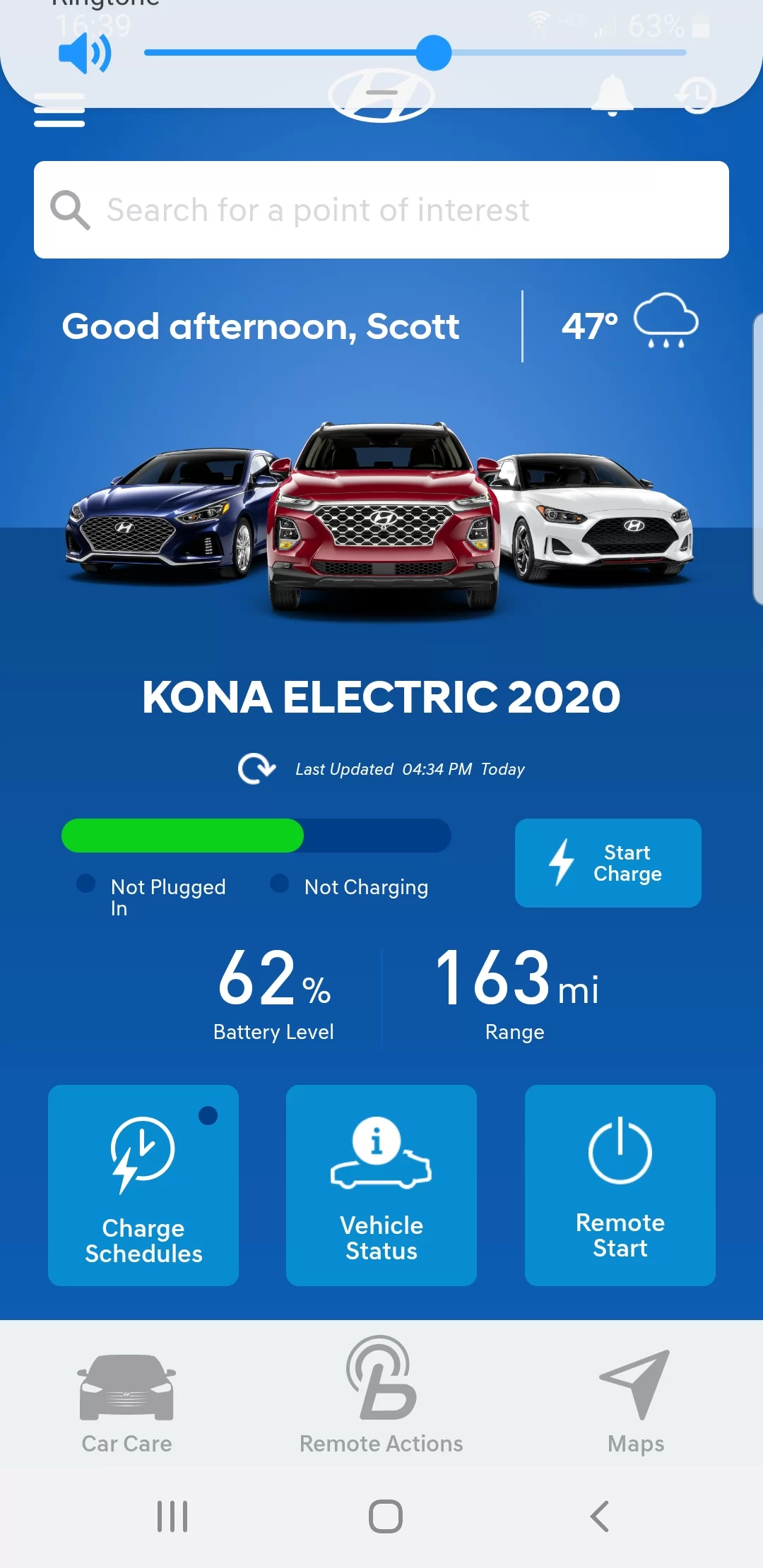
Not sure what car your driving but according to the picture in the background is not a Kona. [emoji2957][emoji41][emoji1787]

So obviously the haven't adapter it to the Kona yet. That was the same here in the US. I had an ice Kona displayed for the first few months.

But it has the same functionalities than ours.
 
Hyundai customer service:

- Also told me that my vehicle didn't have the OPTIONS necessary to use BLuelink Remote. Wrong! This is the ULTIMATE & the Dealership set it all up for me before I left. In fact 1 of the big selling points. Oh, and It actually DID work later that same day ... hmmph...
- The APP seems to toggle between MILES & Kilometers
- The APP Times OUT about every other attempt to get status
- REMOTE START (to turn on the HEAT in my case) Hardly EVER works. I've been successful like 3 times in 2 months.

The Developers should be taken to the shed. :)
I am not the only one being given Hyundai fiction.For an EV,pre conditioning is important[battery health,range, human health in temperature variations] .Next important function,SOC so you don't block a charger for another EV. Otherwise,I could care less about:horn,lights,even locking/unlocking.Given how the Bluelink app.can't manage climate,I don't think I could count on the latter. Envision myself locked out of the Kona if I counted on Bluelink. Hyundai's APP. programming's just amateur for a multi national OEM. Wanted to add,the app.has a different mileage to my odometer's available range,35km/21miles can mean getting home.
 
Do you need a pin to activate your hvac?I need to press on the center climate icon,enter a pin. Or does it work just by pressing start aircon?Once you need heat,do you press hvac settings to switch? You app.vehicle kind of looks like a Scion,Toyota sedan product versus a Kona electrico_O Mine actually looks like the Kona electric I own,but the Bluelink app. consistently
Screenshot_2020-02-25-21-01-21-1.webp
fails.
 
Anybody ever heard from an ICE Hyundai owner how Blue Link works for them? I'm very curious if it's an overall or just an EV issue. Having a screwy app for a few hundred people is very different from tens of thousands.
So I happen to see my ice Kona driving coworker today. And you were right, she's not using bluelink at all. Not subscribed, doesn't want it or sees any use for the features.
For an ice car I think I wouldn't do it either but for us the remote charging and SOC is very handy to have.
 
So I happen to see my ice Kona driving coworker today. And you were right, she's not using bluelink at all. Not subscribed, doesn't want it or sees any use for the features.
For an ice car I think I wouldn't do it either but for us the remote charging and SOC is very handy to have.
why wouldn't they want to precondition the cabin during temperature swings? Wonder if their options are the same as EV.
 
why wouldn't they want to precondition the cabin during temperature swings? Wonder if their options are the same as EV.
Well, i don't know. But I'm happy she doesn't because I assume you would have to start the car which blasts CO2 into the atmosphere. That's one thing I like about an EV.
 
I am not the only one being given Hyundai fiction.For an EV,pre conditioning is important[battery health,range, human health in temperature variations] .Next important function,SOC so you don't block a charger for another EV. Otherwise,I could care less about:horn,lights,even locking/unlocking.Given how the Bluelink app.can't manage climate,I don't think I could count on the latter. Envision myself locked out of the Kona if I counted on Bluelink. Hyundai's APP. programming's just amateur for a multi national OEM. Wanted to add,the app.has a different mileage to my odometer's available range,35km/21miles can mean getting home.

Sounds like you can open the app but you are having trouble with it? What part is causing you the most trouble?
 
USA Android app update: Version 4.2.14 was pushed to my Pixel 2 today and "Remote Start" (aka "Climate Start") is working again. So there's that.

Can confirm - remote start finally working again!

However, learning to use it through google assistant has made getting it going faster than waiting for the app to load its various screens - I may not go back!
 
Can confirm - remote start finally working again!

However, learning to use it through google assistant has made getting it going faster than waiting for the app to load its various screens - I may not go back!

I don't know if it's available on all phone/OSs, but if I long-press the app's icon, then select 'Widgets', there's one called 'Remote Start' which I dragged to the home screen. When I press that, it immediately brings up the PIN screen (or fingerprint login prompt) for Climate Start. No waiting at all!
 
However, learning to use it through google assistant has made getting it going faster than waiting for the app to load its various screens - I may not go back![/QUOTE]

What command(s) do you say to GOOGLE ASSISTANT to START CLIMATE on your phone?
 
I'm running 4.2.11 now......hope an improved version might work.

Just tried it with 4.2.14. It seemed to work, as I got a Request Sent acknowledgment. But then I got a notification that the request couldn't be processed now. When I went out to the car, the climate system had been turned on.
 
Just tried it with 4.2.14. It seemed to work, as I got a Request Sent acknowledgment. But then I got a notification that the request couldn't be processed now. When I went out to the car, the climate system had been turned on.

This is precisely the issue I have had since getting the car mid-December. It ALWAYS tells me that it "couldn't be processed", however, when I get to the car, the Heater is on and the Yellow Lights is ON in the front.
 
This is precisely the issue I have had since getting the car mid-December. It ALWAYS tells me that it "couldn't be processed", however, when I get to the car, the Heater is on and the Yellow Lights is ON in the front.
Just repeated the same thing a few minutes ago. It works...but it still sends the "can't be processed now" message.
 
Back
Top